ScreenCoach has a quantum shift in the current parental control market, much like moving from old style Nokia phones to the iPhone. So, technically speaking, we have no direct competition.
Current screen time management solutions on the market are screen time management only, NOT behavioural change solutions, and no one incorporates pocket money as well. Our solution truly teaches and educates children to manage their time and money better and provides healthier outcomes.
Other Screen Time solutions Still result in parents fighting with their children daily.
ScreenCoach takes the nagging out of parenting because kids are empowered to earn more screen time (within the rules) in a fun game of fight approach
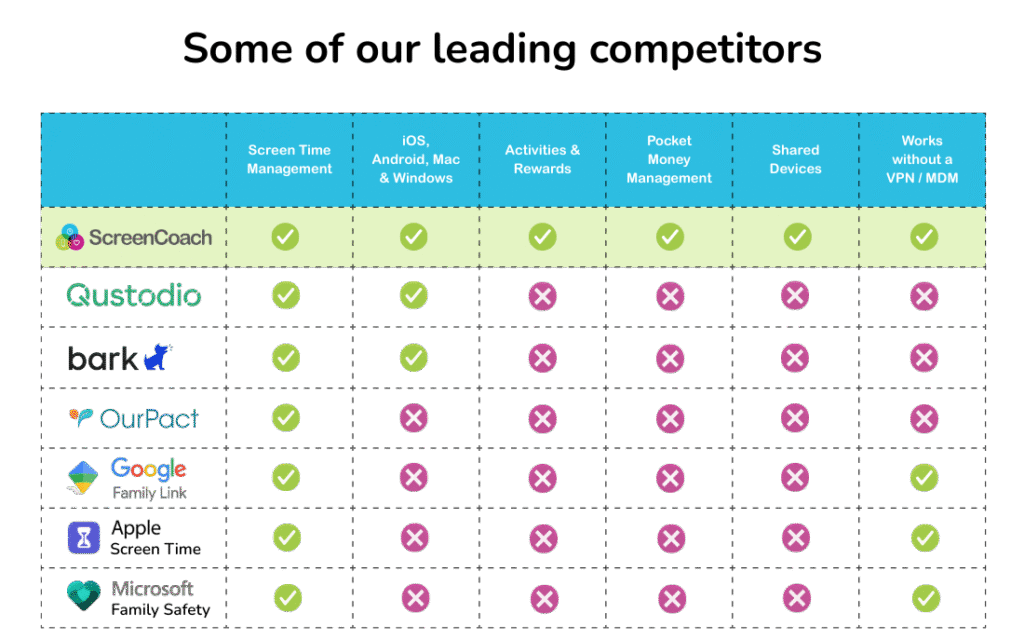
A comparison chart showing how ScreenCoach stands out against leading parental control and screen time solutions such as Qustodio, Bark, OurPact, Google Family Link, Apple Screen Time, and Microsoft Family Safety.
Click respective button below for more detailed comparison charts
Some other solutions have some limited features, but no other solution even has more than a few of these features (summarised below).
The capability to track a child’s screen time across 4 or more all popular platforms, including iOS, Android, Mac, and PC - even when the device is offline! This solves many parents’ battles associated with the device “merry-go-round.” This occurs when time is up on one device and the child simply switches to another one.
The incentive for children to earn more screen time is using advanced task management (activities) with approval workflows, whereby time earned (tokens) can be saved for future redemption.
Activities can have optional consequences, where mode(s) can be blocked if not done by the deadline.
Activities can be scheduled with reminders, eg Bin night every Wednesday at 9 pm.
Shared devices: ScreenCoach tracks and manages individual screen time on shared devices, whereas other solutions assume that each device is exclusively used by just one child. ScreenCoach works online & offline.
ScreenCoach works online & offline.
Simple router-based solutions that block the Internet just result in today’s technology-savvy children finding workarounds, such as using their cell phone connection in lieu of Wi-Fi, playing games offline or watching previously downloaded content.
ScreenCoach works with any Internet connection.
Some solutions use VPNs which cause other issues including your apps thinking that they are not in your own country!
Auto pilot mode - some children who earn the parent’s trust can self-manage, whereas other children in the same family may continue to require parental approval before they receive their tokens and gems for completing desirable activities.
A comprehensive pocket money management system is built directly into the ScreenCoach app.
Behaviour change features. Our smart rewards feature awards bonuses to reinforce/encourage new and desirable behaviours, such as performing a chore without being asked! This encourages responsibility, self-reliance, and leadership early on.
Context-sensitive rule creation is a unique feature of ScreenCoach. For example, a child can continue to use Microsoft Word/ Excel on a laptop or tablet but will not have access to gaming apps while they are doing their homework.
The flexibility and dynamic nature of ScreenCoach allows us to support individual parenting philosophies. No other platform offers such an unprecedented degree of customisation on a child-by-child basis.